License keys
Some packs need a license key as well as their .zip file. The key is a code Gumroad gives you with your purchase. You enter it once on each computer, the app checks it with Gumroad, and the pack is yours.
Do I need one?
Section titled “Do I need one?”Most packs unlock with the .zip alone. If a pack needs a key, the app tells you straight after you drop its .zip: instead of You’re all set!, you see Almost there!, and the pack is marked needs key.
Where to find your key
Section titled “Where to find your key”- In your Gumroad receipt email.
- On the product in your Gumroad library.
It looks like XXXXXXXX-XXXXXXXX-XXXXXXXX-XXXXXXXX. Copy the whole thing. If you bought a set, use the key shown for that purchase in your Gumroad library.
Enter your key
Section titled “Enter your key”-
On Almost there!, click Enter license key (1).
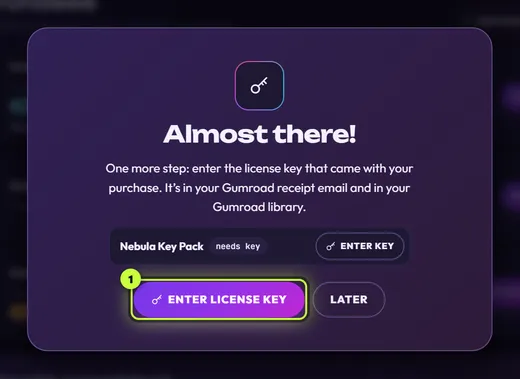
Clicked Later before? Go to Store → My purchases and click Enter key on the pack’s row.

If you clicked Later: Enter key (1) on the pack’s row in My purchases. -
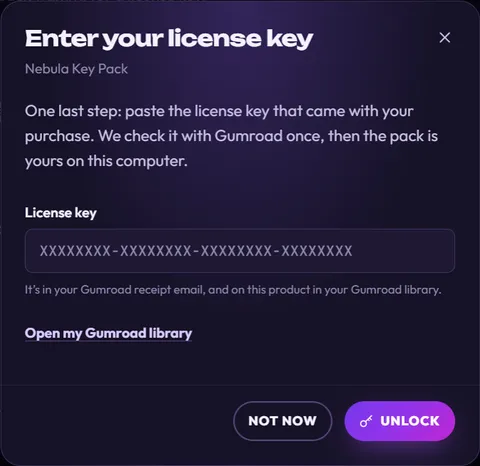
The Enter your license key box opens, with the pack’s name under the title. Paste your key into License key. Need to look it up? Click Open my Gumroad library.
-
Click Unlock (or press Enter). The app shows Checking with Gumroad… for a moment.
-
When the key is right, the box closes and you see Unlocked: with the pack’s name. Click Open to see its elements.

Unlocked several packs that need keys? The app asks for them one after the other. Clicking Not now stops there; the rest wait in My purchases.
If you click Later
Section titled “If you click Later”Later (or Not now) is fine: the pack stays on your computer, marked Locked in My purchases, until you enter the key. Until then its elements don’t appear in the Elements tab, so you can’t preview, download or add them to your stream, and the Shop doesn’t mark the product OWNED.
If the key doesn’t work
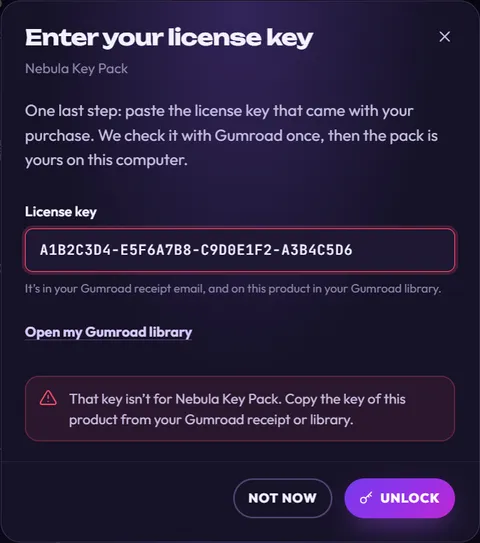
Section titled “If the key doesn’t work”The message appears in red under the field, and the field is selected so you can paste again.
| The message says | What to do |
|---|---|
| That doesn’t look like a license key. Copy it from your Gumroad receipt. | Copy the key again, all of it. |
| That key isn’t for … Copy the key of this product from your Gumroad receipt or library. | It’s the key of another product. Copy the key shown on this product. |
| The license key for … was turned off by the seller. | Email us if you think that’s a mistake. |
| The purchase of … was refunded or charged back, so it can’t be unlocked. | A refunded purchase can’t be unlocked. Email us if that’s wrong. |
| Your access to … has ended. Renew it on Gumroad, then try again. | Renew on Gumroad first. |
| This key for … was already used on too many computers. Contact us to reset it. | Email hello@streamui.fun with your Gumroad receipt and we’ll reset it. |
| Couldn’t reach Gumroad to check your key. Check your internet connection and try again. | Get online, then click Unlock again. |
| Gumroad asked us to slow down. Try again in a minute. | Wait a minute, then try again. |
| Gumroad couldn’t check your key right now. Try again in a few minutes. | Gumroad is busy. Try again a bit later. |
After that: quick checks now and then
Section titled “After that: quick checks now and then”You don’t need to do anything after unlocking. Behind the scenes:
- About once a week, when you start the app, it quietly asks Gumroad again whether the key is still good. This doesn’t count as another use of your key.
- Offline? No problem. A pack stays unlocked for up to 30 days after its last good check. After that it locks until the app can reach Gumroad again.
- If Gumroad says the purchase was refunded or charged back, the key was turned off or replaced, or your access ended, the pack locks again.
A locked pack shows Locked in My purchases with the reason:

| Reason shown | What to do |
|---|---|
| Enter the license key from your Gumroad receipt to use this pack. | You haven’t entered the key yet. Click Enter key (1). |
| This purchase was refunded or charged back, so the pack is locked. | Email us if you think that’s a mistake. |
| The seller turned off this license key. Contact us if you think that’s a mistake. | Email us. |
| Your access to this pack has ended. Renew it on Gumroad, then enter your key again. | Renew on Gumroad, then click Enter key. |
| Your license key doesn’t work any more (it may have been replaced). Enter the current key from your Gumroad library. | Copy the key from your Gumroad library and click Enter key. |
| We couldn’t confirm this purchase with Gumroad for over 30 days. Connect to the internet and check again. | Get online, then click Check again (2). |
Check again (2) asks Gumroad right away. If all is well you see … is unlocked again. If not, a message tells you why it’s still locked, or that Gumroad couldn’t be asked right now.
Elements from a locked pack that you already added to OBS keep showing their last version there, but they don’t update any more.
New computer?
Section titled “New computer?”Keys are saved for your user account on this computer only. On a new computer (or after reinstalling WindowsmacOSLinux), the app asks for the key again when you unlock the pack, and that counts as another use on Gumroad. Copying the app’s files over doesn’t bring the key along. See Restore purchases on a new PC.
What the app sends
Section titled “What the app sends”When it checks a key, the app sends only the product ID and your license key to Gumroad (plus your IP address, which every web request carries). No login, no cookies, and nothing is sent to us. On your computer it keeps the key, the purchase ID, how many times the key was used and a hidden version of your email, like j•••@gmail.com, which My purchases shows as licensed to j•••@gmail.com. All of it is encrypted by Windowsin your Mac’s Keychainwith your desktop’s keyring so it only works for your user account on this computer. More on Privacy.